NFS服务相关端口定义
过会两年时间个人测试环境使用最多的虚拟化平台是PVE了,PVE中使用了独立的网络自管理系统软路由来保证内网拓扑,持久化资源则需要统一保存,虚拟机往往生命周期短,创建和销毁时间随使用场景而有长短。
在测试部署过程为共享资源使用了NFS,当然共享方案还有很多。以下记录了NFS相关的部分细节。
nfs软件包检索
在Linux/Unix软件包查询网站https://pkgs.org 上以nfs关键字检索,在此网站上可以获取包的依赖关系、包集成文件。以下链接可直接跳转到:
- https://pkgs.org/search/?q=nfs 所有有nfs
- https://pkgs.org/download/nfs-utils 重点搜索rhel系
可以定位到在 Debian/Ubuntu 系nfs服务端包名称为nfs-kernel-server
可以定位到在 RHEL/CentOS 系nfs服务端包名称为nfs-utils,本文件主要讨论RHEL下的NFS。
| os_release | nfs packages version / name | config file location |
|---|---|---|
| RHEL/CentOS7 | nfs-utils-1.3.0 | /etc/sysconfig/nfs、/etc/nfs.conf |
| RHEL/CentOS8 Stream | nfs-utils-2.3.3 | /etc/nfs.conf |
| RHEL/CentOS9 Stream | nfs-utils-2.5.4 | /etc/nfs.conf |
除RHEL/CentOS7是两种配置文件方式共存外,在RHEL/CentOS8以后只有/etc/nfs.conf。
nfs-utils 服务端口
除111、2049端口是固定之外,其它端口可以通过配置参数加以固定。
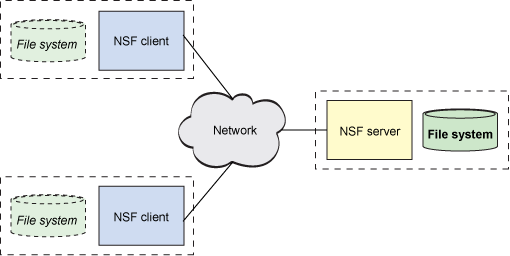
参考:
防火墙设置分为以下几种情况:
NFSv3
- NFSv3-only
- NFSv3 + NFSv4
NFSv4-only
配置服务端
x1# 启用NFSv3需要的防火墙规则2firewall-cmd --permanent --add-service mountd3firewall-cmd --permanent --add-service rpc-bind4firewall-cmd --permanent --add-service nfs5
6# 启用NFSv3需要的防火墙规则,同时指定了固定端口时,额外添加端口规则7firewall-cmd --permanent --add-port=<lockd-tcp-port>/tcp8firewall-cmd --permanent --add-port=<lockd-udp-port>/udp9firewall-cmd --permanent --add-port=<statd-tcp-port>/tcp10firewall-cmd --permanent --add-port=<statd-udp-port>/udp11
12# 重启相关服务13systemctl restart rpc-statd.service14systemctl restart nfs-server.service15
16# 备注:通过在nfs服务端执行rpcinfo -p可以得到17# nlockmgr 对于于/etc/nfs.conf 中的[lockd]18# rpc.statd 对应于/etc/nfs.conf中的[statd]
xxxxxxxxxx71#  启用NFSv4需要的防火墙规则2firewall-cmd --permanent --add-service nfs3
4# 重启相关服务5systemctl restart nfs-server6
7
检查NFS相关端口
可通过ss -nlpt,或 rpcinfo -q验证
xxxxxxxxxx421
2[root@CentOS9 ~]# ss -nlpt | grep -v nginx3State  Recv-Q Send-Q Local Address:Port  Address:Port      Process    4# 状态 收     发            服务端本地端口        远程端口      进程                                      5LISTEN 0      1024         0.0.0.0:111        0.0.0.0:*    users:(("rpcbind",pid=643,fd=8))          6LISTEN 0      64           0.0.0.0:41001      0.0.0.0:*                                              7LISTEN 0      1024         0.0.0.0:41003      0.0.0.0:*    users:(("rpc.mountd",pid=3113184,fd=5))   8LISTEN 0      1024         0.0.0.0:41004      0.0.0.0:*    users:(("rpc.statd",pid=3111994,fd=9))    9LISTEN 0      64           0.0.0.0:2049       0.0.0.0:*                                              10LISTEN 0      1024            [::]:111           [::]:*    users:(("rpcbind",pid=643,fd=11))         11LISTEN 0      64              [::]:41001         [::]:*                                              12LISTEN 0      1024            [::]:41003         [::]:*    users:(("rpc.mountd",pid=3113184,fd=7))   13LISTEN 0      1024            [::]:41004         [::]:*    users:(("rpc.statd",pid=3111994,fd=11))   14LISTEN 0      64              [::]:2049          [::]:*   15
16
17[root@CentOS9 ~]# rpcinfo -p18   program vers proto   port  service19    100000    4   tcp    111  portmapper20    100000    3   tcp    111  portmapper21    100000    2   tcp    111  portmapper22    100000    4   udp    111  portmapper23    100000    3   udp    111  portmapper24    100000    2   udp    111  portmapper25    100024    1   udp  41004  status26    100024    1   tcp  41004  status27    100005    1   udp  41003  mountd28    100005    1   tcp  41003  mountd29    100005    2   udp  41003  mountd30    100005    2   tcp  41003  mountd31    100005    3   udp  41003  mountd32    100005    3   tcp  41003  mountd33    100003    3   tcp   2049  nfs34    100003    4   tcp   2049  nfs35    100227    3   tcp   2049  nfs_acl36    100021    1   udp  41001  nlockmgr37    100021    3   udp  41001  nlockmgr38    100021    4   udp  41001  nlockmgr39    100021    1   tcp  41001  nlockmgr40    100021    3   tcp  41001  nlockmgr41    100021    4   tcp  41001  nlockmgr42
其它端口设置位置
xxxxxxxxxx81[root@Server-83af1803-a240-4112-9d44-05d0b89ae66a ~]# cat /etc/services  | grep NFS2mountd          20048/tcp               # NFS mount protocol3mountd          20048/udp               # NFS mount protocol4nfsrdma         20049/tcp               # Network File System (NFS) over RDMA5nfsrdma         20049/udp               # Network File System (NFS) over RDMA6nfsrdma         20049/sctp              # Network File System (NFS) over RDMA7
8
如果在/etc/nfs.conf中设置的[lockd]端口不生效,可如下设置
在
/etc/modprobe.d/ lockd.conf文件中指定锁定端口,此文件可能需要手动添加:更新
/proc/sys/fs/nfs/nlm_tcpport和/proc/sys/fs/nfs/nlm_udpport的当前值:xxxxxxxxxx51# sysctl -w fs.nfs.nlm_tcpport=<tcp-port>2# sysctl -w fs.nfs.nlm_udpport=<udp-port>34sysctl -w fs.nfs.nlm_tcpport=410015sysctl -w fs.nfs.nlm_udpport=41001重启
rpc-statd和nfs-server服务:xxxxxxxxxx21# systemctl restart rpc-statd.service2# systemctl restart nfs-server.service
/etc/sysconfig/nfs
配置端口的几个参数
xxxxxxxxxx41#LOCKD_TCPPORT=328032#LOCKD_UDPPORT=327693#MOUNTD_PORT=8924#STATD_PORT=662
xxxxxxxxxx101sed  -i -e "1aLOCKD_TCPPORT=41001" -e "1aLOCKD_UDPPORT=41001" -e "1aMOUNTD_PORT=41003" -e "1aSTATD_PORT=41004"  /etc/sysconfig/nfs2
3# 修改效果检查4cat  /etc/sysconfig/nfs5STATD_PORT=410046MOUNTD_PORT=410037LOCKD_UDPPORT=410028LOCKD_TCPPORT=410019
10# 由于LOCKD_TCPPPORT和LOCKD_UDPPORT是TCP和UDP,使用同一个端口号也可以,比如41001
完整的默认参数/etc/sysconfig/nfs
xxxxxxxxxx611# /etc/sysconfig/nfs2# Note: For new values to take effect the nfs-config service3# has to be restarted with the following command:4# systemctl restart nfs-config5#6# Optional arguments passed to in-kernel lockd7#LOCKDARG=8# TCP port rpc.lockd should listen on.9#LOCKD_TCPPORT=3280310# UDP port rpc.lockd should listen on.11#LOCKD_UDPPORT=3276912#13# Optional arguments passed to rpc.nfsd. See rpc.nfsd(8)14RPCNFSDARGS=""15# Number of nfs server processes to be started.16# The default is 8. 17#RPCNFSDCOUNT=1618#19# Set V4 grace period in seconds20#NFSD_V4_GRACE=9021#22# Set V4 lease period in seconds23#NFSD_V4_LEASE=9024#25# Optional arguments passed to rpc.mountd. See rpc.mountd(8)26RPCMOUNTDOPTS=""27# Port rpc.mountd should listen on.28#MOUNTD_PORT=89229#30# Optional arguments passed to rpc.statd. See rpc.statd(8)31STATDARG=""32# Port rpc.statd should listen on.33#STATD_PORT=66234# Outgoing port statd should used. The default is port35# is random36#STATD_OUTGOING_PORT=202037# Specify callout program38#STATD_HA_CALLOUT="/usr/local/bin/foo"39#40#41# Optional arguments passed to sm-notify. See sm-notify(8)42SMNOTIFYARGS=""43#44# Optional arguments passed to rpc.idmapd. See rpc.idmapd(8)45RPCIDMAPDARGS=""46#47# Optional arguments passed to rpc.gssd. See rpc.gssd(8)48# Note: The rpc-gssd service will not start unless the 49# file /etc/krb5.keytab exists. If an alternate50# keytab is needed, that separate keytab file51# location may be defined in the rpc-gssd.service's52# systemd unit file under the ConditionPathExists53# parameter54RPCGSSDARGS=""55#56# Enable usage of gssproxy. See gssproxy-mech(8).57GSS_USE_PROXY="yes"58#59# Optional arguments passed to blkmapd. See blkmapd(8)60BLKMAPDARGS=""61
/etc/nfs.conf
从nfs-utils进入2.x版本后,配置文件/etc/nfs.conf 参数语法采用ini语法,这与samba变得更加一致了。
与固定服务端口有关的几个参数位置变化
xxxxxxxxxx191sed -i -e '/\[mountd\]/a port=41003'  /etc/nfs.conf2sed -i -e '/\[statd\]/a port=41004'  /etc/nfs.conf3sed -i -e '/\[lockd\]/a port=41001'  /etc/nfs.conf4sed -i -e '/\[lockd\]/a udp-port=41001'  /etc/nfs.conf5
6
7## nfs-2.x将参数配置调整到了配置文件nfs.conf中,8# 由于LOCKD_TCPPPORT和LOCKD_UDPPORT是TCP和UDP,使用同一个端口号也可以,比如410019cat   /etc/nfs.conf10[lockd]11udp-port=4100112port=4100113...14[mountd]15port=4100316...17[statd]18port=4100419...
注意,如果lock
nfs-utils-1.3.x默认配置文件
xxxxxxxxxx11
nfs-utils-2.x默认配置文件
配置文件可以从 https://pkgs.org 网站检索到指定的软件包并下载解压查看,不需要进入服务器或测试环境。
xxxxxxxxxx1071#2# This is a general configuration for the3# NFS daemons and tools4#5[general]6# pipefs-directory=/var/lib/nfs/rpc_pipefs7#8[exports]9# rootdir=/export10#11[exportfs]12# debug=013#14[gssd]15# verbosity=016# rpc-verbosity=017# use-memcache=018# use-machine-creds=119use-gss-proxy=020# avoid-dns=121# limit-to-legacy-enctypes=022# context-timeout=023# rpc-timeout=524# keytab-file=/etc/krb5.keytab25# cred-cache-directory=26# preferred-realm=27# set-home=128# upcall-timeout=3029# cancel-timed-out-upcalls=030#31[lockd]32udp-port=4100x33port=4100x34# port=035# udp-port=036#37[exportd]38# debug="all|auth|call|general|parse"39# manage-gids=n40# state-directory-path=/var/lib/nfs41# threads=142# cache-use-ipaddr=n43# ttl=180044[mountd]45port=4100x46# debug="all|auth|call|general|parse"47# manage-gids=n48# descriptors=049# port=050# threads=151# reverse-lookup=n52# state-directory-path=/var/lib/nfs53# ha-callout=54# cache-use-ipaddr=n55# ttl=180056#57[nfsdcld]58# debug=059# storagedir=/var/lib/nfs/nfsdcld60#61[nfsdcltrack]62# debug=063# storagedir=/var/lib/nfs/nfsdcltrack64#65[nfsdcltrack]66# debug=067# storagedir=/var/lib/nfs/nfsdcltrack68#69[nfsd]70# debug=071# threads=872# host=73# port=074# grace-time=9075# lease-time=9076# udp=n77# tcp=y78# vers2=n79# vers3=y80# vers4=y81# vers4.0=y82# vers4.1=y83# vers4.2=y84rdma=y85rdma-port=2004986
87[statd]88port=4100x89# debug=090# port=091# outgoing-port=092# name=93# state-directory-path=/var/lib/nfs/statd94# ha-callout=95# no-notify=096#97[sm-notify]98# debug=099# force=0100# retry-time=900101# outgoing-port=102# outgoing-addr=103# lift-grace=y104#105[svcgssd]106# principal=107
Samba默认参数语法对比
xxxxxxxxxx391# See smb.conf.example for a more detailed config file or2# read the smb.conf manpage.3# Run 'testparm' to verify the config is correct after4# you modified it.5# /etc/samba/smb.conf6
7[global]8        workgroup = SAMBA9        security = user10
11        passdb backend = tdbsam12
13        printing = cups14        printcap name = cups15        load printers = yes16        cups options = raw17
18[homes]19        comment = Home Directories20        valid users = %S, %D%w%S21        browseable = No22        read only = No23        inherit acls = Yes24
25[printers]26        comment = All Printers27        path = /var/tmp28        printable = Yes29        create mask = 060030        browseable = No31
32[print$]33        comment = Printer Drivers34        path = /var/lib/samba/drivers35        write list = @printadmin root36        force group = @printadmin37        create mask = 066438        directory mask = 077539
NFS其它参数
设置nfs服务端使用指定版本
xxxxxxxxxx81[root@centos-8 ~]# vim /etc/nfs.conf2[nfsd]3 vers2=n4 vers3=n5 vers4=y6 vers4.0=y7 vers4.1=y8 vers4.2=yNFS版本比对
这部分列出了 Red Hat Enterprise Linux 支持 NFS 版本及其特性。
目前,Red Hat Enterprise Linux 9 支持以下 NFS 主版本:
- 与 NFSv2 相比,NFS 版本 3(NFSv3)支持安全异步写入操作,并在处理错误时更可靠。它也支持 64 位文件大小和偏移,允许客户端访问超过 2 GB 文件数据。
- NFS 版本 4(NFSv4)通过防火墙,并在 Internet 上工作,不再需要
rpcbind服务,支持访问控制列表(ACL),并且使用有状态操作。
红帽不再支持 NFS 版本 2(NFSv2)。
默认 NFS 版本
Red Hat Enterprise Linux 9 中的默认 NFS 版本为 4.2。NFS 客户端默认试图使用 NFSv4.2 挂载,并在服务器不支持 NFSv4.2 时回退到 NFSv4.1。之后挂载会返回 NFSv4.0,然后回退到 NFSv3。
v4.2版本的特性
以下是 Red Hat Enterprise Linux 9 中的 NFSv4.2 的功能:
服务器端复制
使用
copy_file_range()系统调用,可以使 NFS 客户端高效地复制数据,而不浪费网络资源。稀疏文件
使文件有一个或者多个 洞(hole),它们是不分配或者未初始化的数据块,只由 0 组成。NFSv4.2 中的
lseek()操作支持seek_hole()和seek_data(),这使得应用程序能够在稀疏文件中映射漏洞的位置。保留空间
允许存储服务器保留空闲空间,这会防止服务器耗尽空间。NFSv4.2 支持
allocate()操作来保留空间,支持deallocate()操作来释放空间,支持fallocate()操作来预分配和释放文件中的空间。标记的 NFS
强制实施数据访问权限,并为 NFS 文件系统上的各个文件在客户端和服务器之间启用 SELinux 标签。
布局增强
提供
layoutstats()操作,它可让一些并行 NFS(pNFS)服务器收集更好的性能统计数据。
NFSv4.1 的功能:
- 增强性能和网络安全,同时包括对 pNFS 的客户端支持。
- 对于回调不再需要单独的 TCP 连接,回调允许 NFS 服务器在无法联系客户端的情况下授予委托:例如,当 NAT 或防火墙干扰时。
- 只提供一次语义(除重启操作外),防止出现先前的问题,即如果回复丢失,且操作被发送了两次,则某些操作有时会返回不准确的结果。
附录
端口111服务用途
111端口是SUN公司的RPC(Remote Procedure Call,远程过程调用)服务所开放的端口,主要用于分布式系统中不同计算机的内部进程通信,RPC在多种网络服务中都是很重要的组件。常见的RPC服务有rpc.mountd、NFS、rpc.statd、rpc.csmd、rpc.ttybd、amd等等。在Microsoft的Windows中,同样也有RPC服务。
NFS与RPC关系
服务端需要启动一个NFS服务,服务端要想给客户端提供服务,需要借助RPC协议,RPC协议是由rpcbind服务所实现的;在centos 5或者之前的版本叫portmap服务,centos6及之后的版本叫rpcbind服务,这两个都是一个服务,最终实现了RPC协议的通信。
NFS服务默认不会监听任何端口(启动服务,但不会监听端口),最终监听端口,实现RPC通信的过程是由rpcbind服务产生的RPC协议实现的。
整个流程为:服务端的NFS服务监听一个端口通过RPC协议监听的端口,再去告诉客户端RPC协议,然后NFS客户端通过本机的RPC端口回传数据信息到服务端NFS监听的端口,最终实现通信
如下是文字流程图:
xxxxxxxxxx101NIS:Network Information System 2NFS:基于ip认证3 NFS:2049/tcp, 2019/udp4NFS服务:5 rpcinfo: 查询RPC信息6 nfsd: 负责文件读写,工作在TCP/UDP的2049端口。7 mountd: 负责客户端来源认证的进程,认证成功后接受客户端的挂载请求,工作在随机端口,即时向RPC注册。8 idmapd: 负责用户ID映射。9 quotad:负责限定客户端在本地能使用多大磁盘空间,工作在随机端口,即时向RPC注册。10 nlockmgr: NFS的服务器端锁机制进程,当有一个客户端进程要访问服务器端处理文件之前就会先向NFS注册加锁,以免同时两个客户端进程同时处理一个文件导致文件崩溃;一个进程处理完成之后就会通知NFS释放锁。- showmount通信端口使用[mountd] port,此端口需要先经过rpc查询,即先通111端口
showmount通信端口
使用[mountd]
参考文档 nfs_configure